To use trees in 3D printing, enable tree supports or tree-like supports in your slicing software, orient the model to reduce unsupported overhangs, place branches only where the part needs support, adjust contact point size according to model weight and resin type, then print, clean, cure, and remove supports carefully. Tree supports are useful when a part has curved surfaces, delicate details, organic shapes, dental models, jewelry patterns, prototypes, or areas where traditional block supports would leave too many marks. They are not always the best choice for large flat overhangs, heavy parts, or models that need strong continuous support.
What “Trees” Mean in 3D Printing
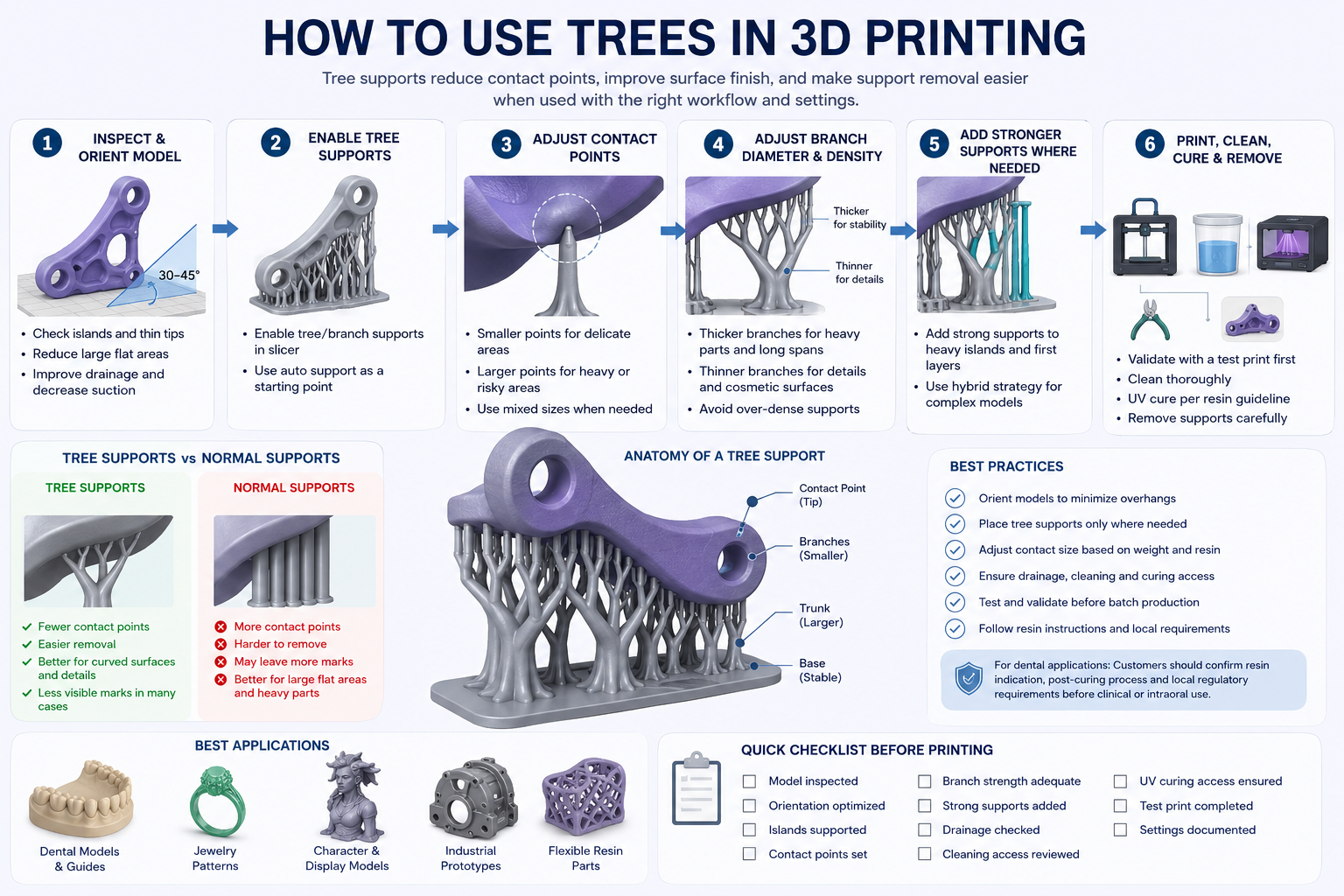
In 3D printing, “trees” usually means tree supports. These are support structures that grow from a base and branch toward the model, similar to a tree trunk and branches. Instead of filling a large area under the part with dense columns or grid supports, tree supports use branching paths to reach only the areas that need support.
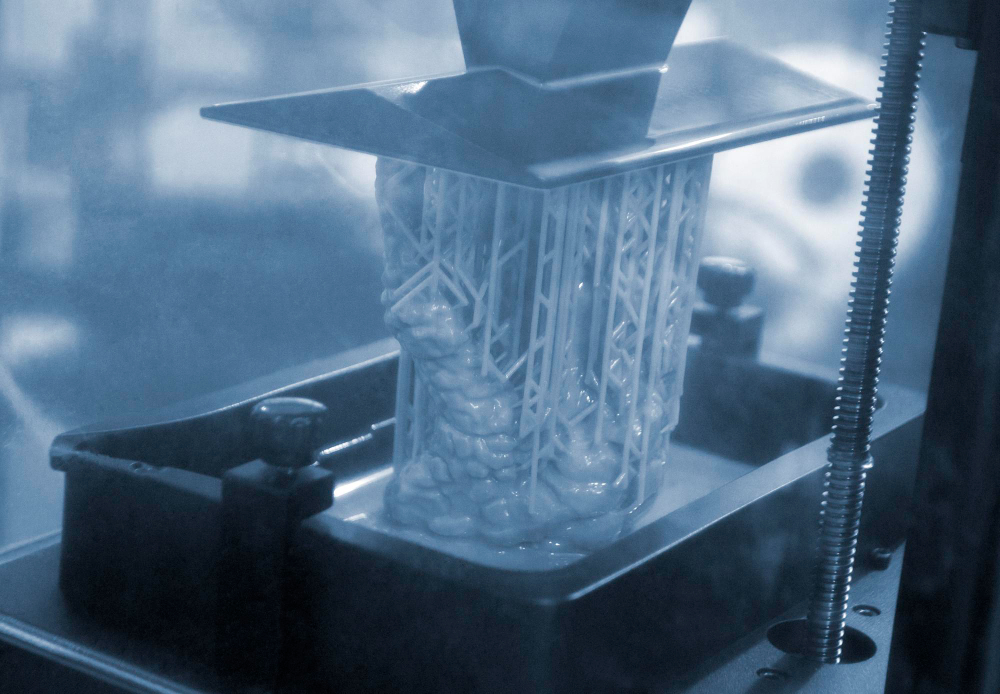
In resin 3D printing, supports are especially important because the printed part is repeatedly lifted from the resin vat during printing. Unsupported islands, thin tips, floating edges, long overhangs, and heavy cross-sections may deform, detach, or fail if they are not properly supported. Tree supports can help reduce contact marks and make support removal easier, depending on the part geometry, resin, orientation, and support settings.
For professional workflows, tree supports should not be treated as a one-click setting. They are part of a complete process that includes model inspection, build orientation, resin selection, exposure settings, washing, UV curing, inspection, and finishing. Yidimu provides industrial resin 3D printers and workflow support for users who need stable results across prototyping, model making, dental applications, and small-batch production.
Why Tree Supports Are Used in Professional 3D Printing
Tree supports are used because they can support overhangs with fewer contact points than many traditional support styles. This may reduce surface scars, save support material, improve access during post-processing, and make delicate parts easier to finish.
Support structures are widely used in additive manufacturing to make overhanging geometry printable. Research on support generation often focuses on reducing unnecessary support material and minimizing contact regions because supports add post-processing work and can affect the finished surface.
For professional users, the benefits are practical:
- Less visible support damage on cosmetic surfaces
- Easier removal around fine details
- Lower support material use in some geometries
- Better access for washing and inspection
- Cleaner surfaces on curved and organic shapes
- More flexible support placement around complex parts
However, tree supports are not automatically better. A tree support can fail if the branch is too thin, the contact point is too small, the model is too heavy, the part orientation creates excessive suction force, or the resin is too flexible or brittle for the selected support strategy.
When Should You Use Tree Supports?
Tree supports are most useful when the part has local overhangs, delicate surface details, curved geometry, organic contours, or areas where normal supports would leave too many marks.
They are commonly useful for:
- Dental models with delicate margins or edges
- Surgical guide models, depending on resin indication and workflow
- Jewelry patterns and castable resin models
- Character models, display models, and detailed prototypes
- Product design samples with smooth visible surfaces
- Shoe components and flexible sample structures
- Research models with complex geometry
- Engineering prototypes with limited support access
For dental applications, customers should confirm resin indication, post-curing process and local regulatory requirements before clinical or intraoral use. Dental printing should be reviewed according to resin instructions, intended application, cleaning method, UV curing conditions, and local compliance requirements.
Yidimu’s dental 3D printers can support professional dental model workflows, but the final result depends on printer setup, resin selection, slicing parameters, cleaning, UV curing, and inspection.
When Tree Supports May Not Be the Best Choice
Tree supports may not be suitable for every model. For production teams, the right support style should be selected according to part geometry and risk level.
Tree supports may be less suitable when:
- The part has a large flat horizontal underside
- The model is heavy and needs broad support
- The first printable layer creates a large suction area
- The part has long straight edges that need continuous support
- Dimensional accuracy is more important than surface appearance in supported areas
- The resin is very flexible and support branches may bend
- The branch network blocks resin drainage or cleaning access
- The support base is too narrow for a tall print
For wide flat overhangs, a stronger support structure or a combination of support types may be safer. In industrial prototyping, a failed print can waste time, resin, and production planning capacity. For this reason, professional users should test support settings with sample parts before moving into repeat workflows.
Practical Table: Tree Supports vs Normal Supports
| Support choice | Best for | Main advantage | Main risk | Professional recommendation |
|---|---|---|---|---|
| Tree supports | Curved parts, delicate details, organic shapes, cosmetic surfaces | Fewer contact points and easier removal in many cases | May be unstable for heavy or wide flat areas | Use for detailed resin models after checking islands and branch strength |
| Normal column supports | General resin models, medium overhangs, predictable workflows | Easy to control manually and widely supported | Can leave many marks if overused | Good default for dental models, prototypes, and repeatable lab workflows |
| Dense supports | Heavy parts, large cross-sections, risky overhangs | Stronger holding force | More scars, more post-processing | Use when print success is more important than surface finish |
| Hybrid support strategy | Complex industrial or dental models | Balances stability and surface quality | Requires more setup time | Recommended for professional workflows with mixed geometry |
| Manual custom supports | Critical surfaces, production validation, dental margins, thin walls | Better control over contact points | Requires operator skill | Use for high-value parts or repeat production |
How to Use Trees in 3D Printing: Step-by-Step Workflow
Step 1: Inspect the Model Before Adding Supports
Before generating tree supports, inspect the model for:
- Unsupported islands
- Thin tips
- Sharp edges
- Hollow sections
- Drainage holes
- Large flat overhangs
- Deep cavities
- Areas that must remain smooth
- Critical fitting surfaces
In resin 3D printing, small unsupported islands can lead to failed details, cured debris in the vat, surface defects, or incomplete geometry. Tree supports should be placed only after you understand where the model actually needs support.
Step 2: Choose the Right Build Orientation
Orientation is usually more important than the support type. A poorly oriented model with tree supports can still fail.
For resin printing, consider:
- Reducing large cross-section areas per layer
- Angling flat surfaces instead of printing them horizontally
- Keeping visible cosmetic surfaces away from heavy support contact
- Orienting functional fitting surfaces carefully
- Allowing resin to drain from hollow sections
- Reducing suction force during layer separation
- Keeping tall, thin parts stable during printing
For factories and product development teams, orientation should also reflect the final inspection requirement. If the supported surface will be sanded, assembled, or hidden, it can accept more support contact. If the surface is visible or dimension-critical, support placement should be minimized or moved.
Professional users working with industrial samples can review Yidimu’s industrial 3D printing solutions to match part geometry, resin type, and post-processing expectations before production.
Step 3: Enable Tree Supports in the Slicer
Most professional slicing workflows allow users to generate supports automatically and then manually edit them. If your slicer includes tree or branch-style supports, enable the feature and start with conservative settings.
Do not rely only on automatic support generation. Auto-generated tree supports can miss islands, over-support non-critical areas, or create weak branches. Use automatic support as a starting point, then manually inspect and adjust.
Step 4: Set Contact Point Size
Contact point size controls how strongly the support attaches to the printed model. Smaller contact points can be easier to remove and may leave fewer marks, but they may not hold heavy or high-stress areas. Larger contact points can improve stability, but they may leave more visible marks.
A practical starting logic:
- Use smaller contact points for fine details and cosmetic surfaces.
- Use medium contact points for general dental models and prototypes.
- Use larger contact points for heavy overhangs, thick parts, and high-risk islands.
- Use mixed contact sizes on the same model if the geometry requires it.
The right contact point depends on resin behavior, exposure settings, part weight, lift force, and model orientation.
Step 5: Adjust Branch Diameter and Density
Tree support branches must be strong enough to survive printing, washing, and handling. If branches are too thin, they may bend, break, or fail to hold the model. If branches are too thick or too dense, they may become difficult to remove and may block cleaning access.
For professional resin printing, avoid extremely thin support branches on:
- Tall prints
- Heavy parts
- Flexible resin parts
- Large cross-sections
- High-detail models with long print times
- Parts with strong suction during peeling
If a part is printed with flexible or elastic resin, the support structure may need special review. Users working with soft material applications can review Yidimu’s flexible resin 3D printers and confirm resin-specific support settings before production.
Step 6: Add Stronger Supports to Critical Areas
Tree supports can be combined with stronger supports. This hybrid strategy is often safer for professional workflows.
Use stronger supports for:
- First contact points
- Heavy islands
- Large overhangs
- Long edges
- Functional geometry
- Parts with high peel force
- Areas that failed in previous test prints
Use lighter tree branches for:
- Small local details
- Cosmetic curves
- Fine tips
- Low-stress overhangs
- Areas where surface marks must be reduced
This is especially useful for dental labs and model-making companies that need both clean surfaces and stable repeatability.
Step 7: Check Drainage, Washing, and UV Curing Access
In resin 3D printing, support design affects more than printing. It also affects cleaning and curing.
Before printing, check:
- Can uncured resin drain from hollow areas?
- Will the tree branches trap resin?
- Can cleaning liquid reach supported surfaces?
- Can the UV curing process reach the required surfaces?
- Are support contacts placed away from critical fitting areas?
- Will removal damage the part after curing?
Yidimu’s UV curing boxes can support controlled post-curing workflows for resin printed models, but curing conditions should be matched with the resin instructions and application requirements.
Step 8: Print a Validation Sample Before Production
For professional users, tree support settings should be validated. A small test run can reveal whether the support contact, branch thickness, orientation, and resin workflow are suitable.
Check the first sample for:
- Support failure
- Surface scars
- Warping
- Missing details
- Cracks near contact points
- Incomplete curing
- Poor washing access
- Dimensional deviation
- Difficult support removal
If the part is important for dental, industrial, or functional evaluation, do not move directly into batch printing before validating the workflow.
Tree Support Checklist for Resin 3D Printing
Use this checklist before sending a professional resin print job to production:
- Model inspected for islands and unsupported areas
- Build orientation selected to reduce suction and visible support marks
- Critical surfaces identified before support placement
- Tree supports used only where they improve access or surface finish
- Contact point size adjusted according to part weight and resin type
- Stronger supports added to heavy islands and risky overhangs
- Branch diameter checked for stability
- Support base checked for adhesion and balance
- Hollow parts given proper drainage when needed
- Cleaning access reviewed before printing
- UV curing process matched with resin instructions
- Dental resin indication and local requirements confirmed when applicable
- Test print completed before repeat production
- Failed print causes documented for parameter adjustment
Best Applications for Tree Supports in Yidimu Workflows
Industrial Prototypes
Tree supports can be helpful for industrial prototypes with smooth exterior surfaces, curved housings, ergonomic parts, product samples, or design verification models. They may reduce visible support marks and help keep the prototype presentation-ready after finishing.
However, for jigs, fixtures, and mechanical test parts, surface appearance may be less important than dimensional stability. In those cases, a stronger or hybrid support strategy may be better.
Dental Models and Dental Workflow Parts
Tree supports may support dental models, surgical guide models, orthodontic models, or temporary dental workflow parts depending on resin, indication, geometry, and post-processing requirements. Dental applications require careful handling because the final use may be regulated.
Customers should confirm resin indication, post-curing process and local regulatory requirements before clinical or intraoral use. For dental workflows, Yidimu’s dental 3D printing solutions can help users think through printer selection, resin matching, cleaning, curing, and inspection.
Jewelry and Castable Models
Tree supports can be useful for jewelry patterns because they may reduce contact marks on delicate details. For castable resin workflows, support removal and surface preparation can affect the final casting quality. Operators should place support contacts in areas that are easier to finish.
Yidimu’s 3D printing resins include materials for different professional applications. Resin choice should be confirmed based on model purpose, curing workflow, finishing requirement, and final use.
Flexible Resin Parts
Flexible resin parts need careful support design because the material may deform under load. Tree branches that are too thin may bend during printing or cleaning. For flexible samples, such as shoe components or elastic prototypes, users may need stronger trunks, wider bases, and carefully placed contact points.
Model-Making and Display Parts
For model-making companies, tree supports can help preserve visible surfaces and reduce manual finishing. They are especially useful for curved, sculptural, and high-detail models. But large display models may require segmentation, assembly planning, and mixed supports.
How to Decide Support Strength
A useful rule is to match support strength to the risk of failure.
Use lighter tree supports when:
- The supported area is small
- The part is lightweight
- The surface is visible
- The resin is not too flexible
- The branch path is short and stable
- The support is mainly for a small detail
Use stronger supports when:
- The part is heavy
- The island appears early in the print
- The overhang is wide
- The contact area carries high peel force
- The resin is flexible or tough
- The print has failed before
- The geometry is dimension-critical
Use hybrid supports when:
- The model has both cosmetic and structural areas
- Some surfaces must stay smooth while others need strong holding force
- A dental or industrial part requires repeatability
- The part will be printed in batches
- The cost of failure is high
Common Mistakes to Avoid
Mistake 1: Using Tree Supports Everywhere
Tree supports are useful, but they should not be applied blindly. Overusing them can create unnecessary branch networks, block cleaning access, and make inspection harder.
Mistake 2: Using Contact Points That Are Too Small
Small contact points look attractive because they are easier to remove, but they can fail during printing. If the part is heavy or the overhang is large, use stronger contact points or add additional supports.
Mistake 3: Ignoring Model Orientation
A bad orientation cannot be fixed by tree supports alone. If the model creates large suction force, wide unsupported layers, or poor drainage, support failure may still happen.
Mistake 4: Supporting Critical Fitting Surfaces
Do not place heavy support marks on surfaces that must fit, seal, align, or be measured. Move supports to less critical areas whenever possible.
Mistake 5: Forgetting the Cleaning and Curing Workflow
Tree supports can trap resin if the branch network is too dense. Always check whether washing and UV curing can reach the required surfaces.
Mistake 6: Removing Supports Too Aggressively
Support removal should be controlled. For some resins, removing supports before final curing may reduce breakage; for others, the workflow may require partial curing first. Follow resin instructions and test the process.
Mistake 7: Treating Dental Parts Like General Models
Dental applications may require specific resin indication, cleaning, curing, inspection, and regulatory review. Customers should confirm resin indication, post-curing process and local regulatory requirements before clinical or intraoral use.
Troubleshooting Tree Support Problems
| Problem | Possible cause | Practical fix |
|---|---|---|
| Branches break during printing | Branches too thin, part too heavy, poor orientation | Increase branch diameter, add stronger supports, reduce suction force |
| Contact points leave deep marks | Contact points too large or poorly placed | Move contacts to hidden areas, use mixed support sizes, improve orientation |
| Unsupported details fail | Islands missed by auto-support | Manually inspect islands and add local supports |
| Model warps after printing | Poor orientation, uneven support, resin shrinkage, curing issue | Improve support distribution, validate resin workflow, control UV curing |
| Supports are hard to remove | Dense branches, excessive contact size, over-curing before removal | Reduce density, adjust contact depth, review removal timing |
| Resin remains trapped | Poor drainage or dense tree network | Add drainage holes, reduce branch density, improve washing access |
| Flat underside is rough | Tree supports not enough for broad flat area | Use stronger supports or redesign orientation |
| Batch results are inconsistent | Settings not validated or resin workflow unstable | Print validation samples and document parameters |
How to Use Trees in 3D Printing for Batch or Repeat Workflows
For one-off models, tree supports can be adjusted visually. For repeat production, the workflow should be documented.
A professional support setup record may include:
- Model name and version
- Resin type and batch
- Printer model
- Layer thickness
- Exposure settings
- Lift settings
- Orientation angle
- Tree support settings
- Manual support notes
- Washing method and time
- UV curing method and time
- Inspection result
- Failure notes
- Final approved support file
This is important for dental labs, factories, and model-making companies because support settings affect both print success and surface finishing time.
Yidimu supports professional users with equipment selection, resin matching, post-processing planning, and sample review. Users can also request sample printing service before choosing a complete workflow.
Conclusion: How to Use Trees in 3D Printing Correctly
The best way to use trees in 3D printing is to treat tree supports as a controlled support strategy, not a simple automatic setting. Start with the model geometry, choose an orientation that reduces unsupported areas, use tree supports for delicate or cosmetic regions, add stronger supports where the part needs stability, and validate the full resin workflow before repeat printing.
Tree supports can improve resin 3D printing results when they are matched with the right printer, resin, contact size, branch strength, cleaning process, and UV curing workflow. For factories, dental labs, clinics, model-making companies, and product development teams, the goal is not only to print successfully once. The goal is to build a stable, repeatable workflow.
For project evaluation, contact Yidimu with your model size, resin requirement, application, expected workflow, surface finish requirement, and daily printing volume. Yidimu can help recommend a suitable resin 3D printer, material direction, and post-processing workflow for professional use.
FAQ
What does “trees” mean in 3D printing?
In most 3D printing discussions, “trees” means tree supports. These are branching support structures that grow from the build platform or another support base and reach toward overhangs, islands, and delicate areas of the model.
Are tree supports better than normal supports?
Tree supports can be better for curved surfaces, organic shapes, delicate models, and cosmetic parts because they may use fewer contact points. Normal supports may be better for large flat overhangs, heavy parts, or areas that need strong continuous support.
Can I use tree supports for resin 3D printing?
Yes, tree supports can be used in resin 3D printing, depending on the slicing software and model geometry. Resin users should pay attention to orientation, suction force, branch strength, contact point size, cleaning access, and UV curing workflow.
Are tree supports good for dental 3D printing?
Tree supports may be useful for some dental models and workflow parts, depending on the resin, indication, geometry, and required accuracy. Customers should confirm resin indication, post-curing process and local regulatory requirements before clinical or intraoral use.
Do tree supports reduce support marks?
They can reduce visible support marks in many cases because they often use smaller and more localized contact points. However, support marks also depend on contact size, exposure settings, resin behavior, curing process, and removal method.
Why did my tree supports fail?
Common causes include weak branches, contact points that are too small, poor orientation, heavy islands, high suction force, insufficient base stability, or unsuitable resin settings. Increase support strength and review the model orientation before reprinting.
Should I remove tree supports before or after UV curing?
This depends on the resin and workflow. Some resin parts are easier to support-remove before final curing, while others need a controlled curing step first. Follow the resin instructions and validate the process with test prints.
Can tree supports be used for flexible resin parts?
Yes, but flexible resin parts need careful support planning. Branches may bend if they are too thin. Flexible parts may need stronger trunks, wider bases, and more conservative contact settings.
Do tree supports save resin?
They may reduce support material for some models because they branch only toward required areas. However, resin savings are not guaranteed. If the model needs heavy support or dense branching, the difference may be smaller.
What is the safest support strategy for professional printing?
For professional resin printing, a hybrid strategy is often safest: use stronger supports for high-risk areas and tree supports for delicate or cosmetic regions. Always validate the setup before batch printing.
Optional References
- ISO/ASTM 52900 establishes standard terminology for additive manufacturing, which helps keep 3D printing terminology consistent across professional workflows.
- NIST describes additive manufacturing as using digital designs to fabricate products layer by layer and emphasizes the importance of measurements and standards for industrial adoption.
- Research on tree-like support generation highlights that support structures are often needed for overhangs but add material and post-processing work, which is why support optimization matters.
- Yidimu’s English website describes resin 3D printing equipment, photopolymer materials, UV curing equipment, and workflow support for dental labs, factories, product development teams, and professional manufacturing users.