The right 3D printer depends on what parts you need to produce, their dimensions, required material properties, surface and detail requirements, production quantity, workflow, operating environment and available budget.
There is no single printing technology that is best for every application. A machine that performs well for high-detail jewelry patterns may be unsuitable for large thermoplastic fixtures. A printer selected for dental laboratory models must be evaluated differently from one used for engineering prototypes or classroom projects.
The most reliable way to answer “what 3D printer should I buy?” is to define the application first, compare the technologies that can satisfy it, and then test representative parts before choosing equipment.
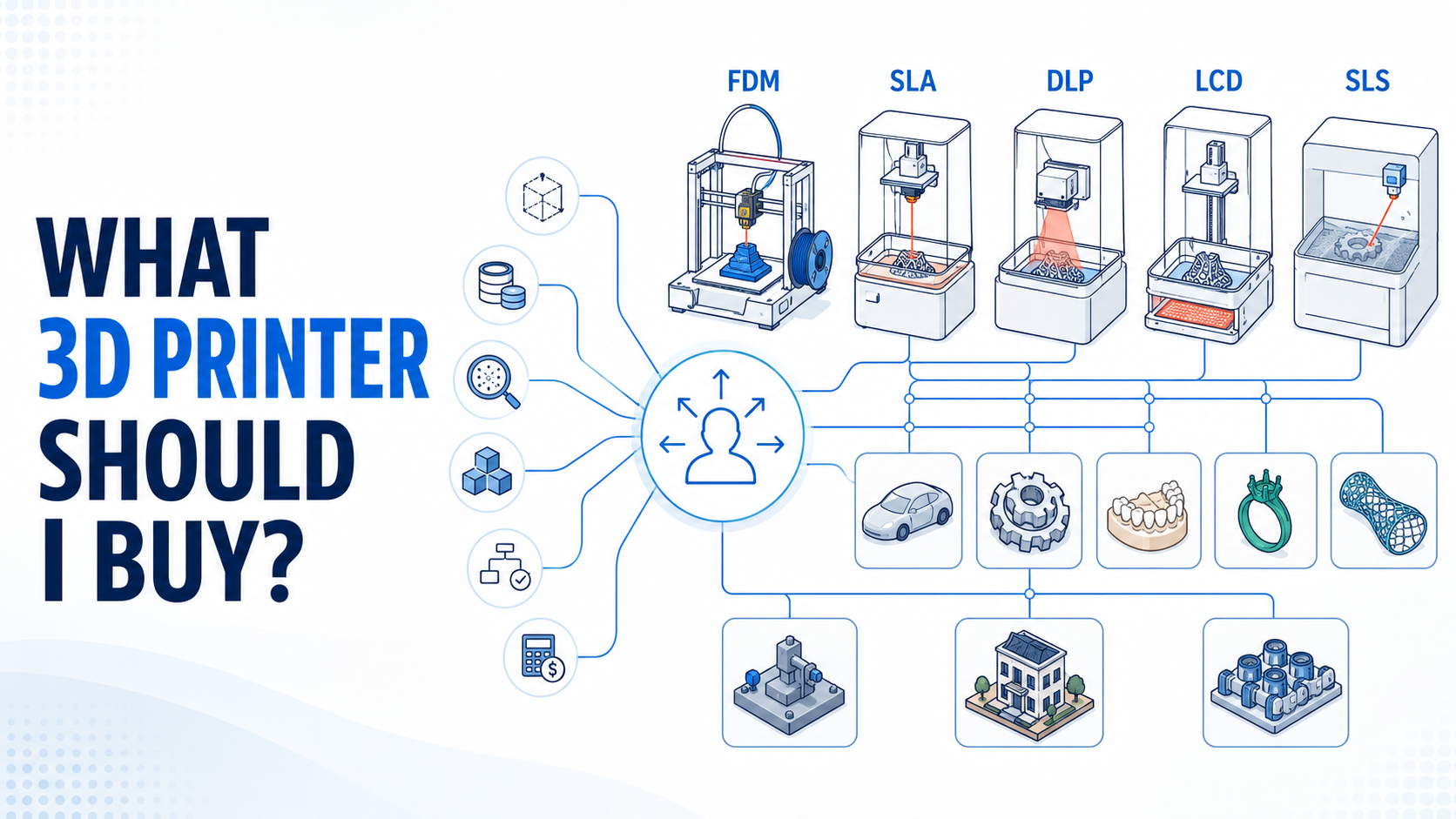
Consider these general starting points:
- Choose FDM/FFF when you need accessible thermoplastic printing, larger parts, simple functional prototypes, fixtures or low-cost iteration and can accept visible layer lines.
- Evaluate laser-based SLA when smooth surfaces, fine features and controlled laser exposure are priorities.
- Evaluate DLP when projected whole-layer resin exposure and detailed vat-photopolymerization workflows suit the required part size and material.
- Evaluate LCD/MSLA when you need detailed resin parts, batch printing across the platform and access to compatible photopolymer materials.
- Evaluate polymer SLS when functional nylon parts, complex geometry and support-free powder-bed nesting are more important than having a simple office workflow.
SLA, DLP and LCD/MSLA all belong to vat photopolymerization, but they are not identical processes. ISO/ASTM 52900 defines vat photopolymerization as selectively curing liquid photopolymer in a vat through light-activated polymerization. It separately classifies nozzle-based material extrusion and powder bed fusion as different additive manufacturing process categories. ISO/ASTM 52900:2021
Start With the Part, Not the Printer
Before comparing machine specifications, write down exactly what the printer must produce.
A useful requirements statement might look like this:
We need to produce five to ten detailed enclosure prototypes per week. The largest part is 240 × 150 × 80 mm. Cosmetic surfaces are important, two mating features must be inspected, and the parts will be painted rather than used under continuous mechanical load.
That statement is more useful than saying, “We need the highest-resolution printer available.”
For every application, define:
- Part type and final use
- Maximum and typical dimensions
- Number of parts per day, week or month
- Critical features and mating surfaces
- Surface finish expectations
- Required stiffness, toughness, flexibility or heat resistance
- Expected loads and service environment
- Whether the part will be painted, bonded, cast or assembled
- Acceptable support marks
- Inspection and traceability requirements
- Available space, ventilation and operator time
- Purchase and operating budget
A Step-by-Step 3D Printer Selection Process
1. Define the intended application
Decide whether the printer will produce visual models, functional prototypes, dental working models, casting patterns, tools, flexible structures or low-volume parts.
One organization may need more than one technology. A design department could use resin printing for presentation models and FDM for large internal fixtures.
2. Record typical and maximum part dimensions
Do not select a machine from build-volume numbers alone. The usable area may be reduced by:
- Model orientation
- Support structures and rafts
- Platform margins
- Peel or separation forces in bottom-up resin systems
- Thermal distortion or edge warping
- Powder nesting rules
- Access needed for part removal
- Tall-part stability
Ask the supplier to prepare your largest real file, including orientation and supports, inside the proposed build volume.
3. Identify the required material behavior
“Strong” is not a complete material requirement. Define the property that matters:
- Tensile or flexural performance
- Impact resistance
- Elongation and rebound
- Hardness
- Heat resistance
- Creep behavior
- Dimensional stability
- Chemical resistance
- Weathering or UV exposure
- Burnout behavior
- Color, translucency or appearance
- Application-specific regulatory status
Compare technical data sheets under relevant test conditions. Do not assume that a resin described as “ABS-like” is chemically or mechanically identical to injection-molded ABS.
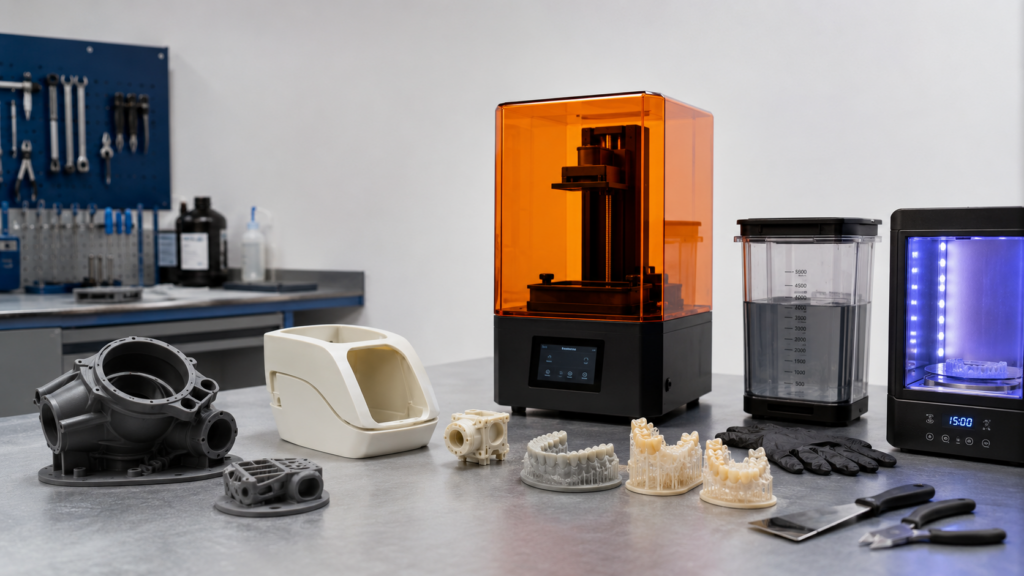
4. Define detail, surface and dimensional requirements
These are related but different:
- Feature detail describes whether small text, grooves, holes, edges or textures can be reproduced.
- Surface finish describes the visible and tactile condition of the part.
- Dimensional performance describes how closely measured features match the intended geometry after printing and post-processing.
Pixel size, layer height or laser spot size alone does not establish final dimensional performance. Resin behavior, optics, exposure, orientation, supports, shrinkage, cleaning and post-curing also affect the result.
5. Estimate production quantity and throughput
Calculate throughput using actual build preparation and post-processing—not a headline speed.
Include:
- File preparation
- Support generation
- Printer setup
- Exposure or deposition time
- Cooling, draining or powder conditioning
- Part removal
- Washing and drying
- Support removal
- UV post-curing
- Surface finishing
- Inspection
- Failed-build recovery
- Changeover between materials
For DLP and LCD/MSLA, exposing more parts within the same layer may not increase exposure time in the same way as adding more laser scan area in laser-based SLA. However, total production time still depends on layer count, lift motion, resin flow, part orientation and post-processing.
6. Check the complete workflow
Confirm that the printer works with your CAD, dental CAD or engineering workflow. Review:
- Accepted file formats
- Slicing software
- Support-editing controls
- Orientation tools
- Parameter access
- Network and offline operation
- Job records
- Material profiles
- Software licensing
- Update policy
- Export restrictions
- Compatibility with existing inspection systems
A good machine can become inefficient if operators must repeatedly repair files or manually transfer job information.
7. Review the operating environment
Determine whether the printer can be installed safely and practically.
Consider:
- Machine footprint and access clearance
- Stable temperature and humidity
- Ventilation or local exhaust
- Electrical requirements
- Resin, filament or powder storage
- Cleaning and curing areas
- Spill containment
- Fire and solvent controls
- Personal protective equipment
- Waste collection and disposal
- Noise and heat
- Separation from offices, classrooms or public areas
NIOSH notes that some liquid photopolymer chemicals may cause skin irritation or sensitization and recommends controls such as ventilated enclosures, local exhaust, safe handling practices and appropriate PPE. Always consult the material’s SDS and the equipment manufacturer’s instructions. NIOSH safe 3D printing guidance
8. Request a representative sample print
A sample made from your own file is more useful than a standard display model. It allows you to examine the printer, material and post-processing workflow as one system.
YIDIMU’s sample printing service is intended for this type of resin workflow evaluation.
3D Printing Technology Comparison
| Technology | How it forms a layer | Potential strengths | Important limitations | Often evaluated for |
|---|---|---|---|---|
| FDM/FFF | Heated material is selectively deposited through a nozzle | Thermoplastic material options, accessible operation, larger parts, practical fixtures and functional prototypes | Layer lines, direction-dependent properties, warping, nozzle-related feature limits and supports for many overhangs | Concept models, engineering prototypes, jigs, fixtures, large models, education |
| Laser-based SLA | A controlled laser scans selected regions of liquid photopolymer | Fine features, smooth surfaces and controlled point-scanning exposure | Liquid-resin handling, supports, washing, drying, UV curing and scan time affected by geometry | Detailed prototypes, master models, dental models and jewelry patterns |
| DLP | A digital projector exposes a patterned image for each resin layer | Whole-layer exposure, detailed parts and efficient platform-based production in suitable geometries | Projected pixel and optical behavior, limited build-field options, supports and complete resin post-processing | Dental models, jewelry patterns, small detailed parts and batch resin workflows |
| LCD/MSLA | An LCD screen masks a UV light source to expose each resin layer | Whole-layer masked exposure, detailed surfaces and ability to arrange multiple parts across the platform | Pixel size is not the same as accuracy; screen, light source, film and exposure uniformity require evaluation | Detailed models, dental working models, prototypes and low-volume resin parts |
| Polymer SLS | A laser selectively fuses regions of a polymer powder bed | No separate support structures, complex geometry, functional polymers and efficient three-dimensional nesting | Higher equipment and facility requirements, powder management, depowdering, cooling and typically more granular surfaces | Functional parts, ducts, housings, complex assemblies and production batches |
FDM/FFF is a common commercial name for material-extrusion printing. SLS is a powder bed fusion approach. SLA, DLP and LCD/MSLA are vat-photopolymerization approaches, distinguished mainly by how light is delivered to each layer.
The terms should not be treated as interchangeable:
- Laser-based SLA scans a laser across the required geometry.
- DLP projects a layer image through a digital micromirror-based optical system.
- LCD/MSLA uses an LCD as a dynamic mask between the light source and resin vat.
These differences influence optical calibration, exposure behavior, build-area design, throughput and component maintenance.
Application-Based Decision Table
| Application | Main priorities | Potentially suitable technologies | Points to verify |
|---|---|---|---|
| Concept models and visual prototypes | Fast iteration, appearance, manageable cost | FDM/FFF, SLA, DLP, LCD/MSLA | Model size, finish, color, painting needs and turnaround |
| Functional engineering prototypes | Material behavior, fit, assembly and load response | FDM/FFF, SLS, selected engineering resins | Test conditions, anisotropy, temperature, creep, impact and chemical exposure |
| High-detail resin models | Fine features, smooth surfaces and presentation quality | Laser SLA, DLP, LCD/MSLA | Small-feature reproduction, support marks, cleaning and curing |
| Dental laboratory working models | Model detail, consistency, material indication and documented workflow | DLP, LCD/MSLA, laser SLA where appropriate | Dental software, validated resin, curing process, inspection and local requirements |
| Jewelry casting patterns | Fine details, clean surfaces and burnout behavior | Laser SLA, DLP, LCD/MSLA | Castable resin, supports, cleaning, curing, investment compatibility and complete casting trials |
| Flexible parts and elastomeric structures | Elongation, rebound, tear behavior and geometry | Specialized resin systems, FDM/FFF with suitable elastomers, SLS with suitable flexible powders | Hardness, wall thickness, lattice design, aging, tear resistance and post-curing |
| Jigs, fixtures and tooling aids | Durability, size, cost and repeatability | FDM/FFF, SLS, selected engineering resins | Loads, wear, heat, chemicals, inserts and replacement frequency |
| Large-format models | Build volume, distortion control and practical material cost | Large-format FDM/FFF, large resin systems, segmented production | Usable volume, orientation, support demand, warping, weight and handling |
| Small-batch production | Repeatability, nesting, labor and unit economics | DLP, LCD/MSLA, SLS, FDM/FFF depending on part | Multi-part consistency, failure rate, finishing labor, traceability and material supply |
| Education and research | Safety, material access, control of variables and maintainability | FDM/FFF, enclosed resin systems, other processes when facilities allow | Supervision, ventilation, PPE, software access, documentation and experimental flexibility |
These are selection directions, not universal recommendations. The final choice should be based on representative parts and the complete operating workflow.
How to Evaluate the Factors That Matter
Part size and usable build volume
Compare the largest supported and oriented part—not only the nominal X, Y and Z dimensions. For batch printing, examine how many real parts fit with supports and safe spacing.
A larger platform is useful only if optical uniformity, motion control, separation behavior and post-processing capacity remain suitable across that area.
Feature detail and surface finish
Use representative geometries such as:
- Fine raised and recessed text
- Narrow slots
- Small holes and pins
- Sharp edges
- Thin walls
- Textured surfaces
- Curved cosmetic surfaces
- Internal channels
- Support-sensitive areas
Do not judge detail from one heavily optimized display model.
Dimensional requirements
Identify critical-to-function dimensions before printing. Measure parts only after the specified cleaning, drying and curing process.
For production evaluation, print multiple copies in different platform positions and repeat the build. This reveals more about process consistency than measuring a single sample.
Material properties
Separate appearance requirements from engineering requirements. A material with a smooth surface may not provide the required impact resistance, heat resistance or long-term flexibility.
Ask for current technical data, SDS documentation and recommended processing conditions. For dental or other controlled applications, verify the precise material indication and required validated workflow.
Resin or filament compatibility
Check:
- Material wavelength or processing compatibility
- Whether third-party materials are permitted
- Availability of editable parameters
- Supplier-supported profiles
- Storage temperature and shelf-life requirements
- Batch traceability
- Regional supply
- Cleaning method
- Required post-curing wavelength and conditions
“Open material system” does not mean every material will work without calibration.
Support structures
FDM and vat-photopolymerization systems normally need supports for many overhangs, although the requirements differ. SLS powder surrounds the parts during printing, so separate support structures are generally unnecessary.
Review:
- Support-generation controls
- Contact-point size
- Removal effort
- Marks on cosmetic surfaces
- Effect on thin or flexible features
- Added material use
- Orientation trade-offs
- Internal supports that may become trapped
Print consistency and repeatability
Ask for evidence from repeated builds, not only a single successful part. A useful evaluation includes:
- Multiple copies across the platform
- Repeated builds on different days
- Critical-feature measurements
- Failure and rework records
- Material-batch information
- Post-processing records
- Inspection after final conditioning
Repeatability depends on the printer, material, settings, environment and operator-controlled processes.
Production quantity and throughput
Calculate parts per completed workflow, not millimeters per hour.
A machine that prints a full platform quickly may still create a bottleneck if washing, drying, support removal or curing capacity is insufficient. Compare printer capacity with staffing and post-processing equipment.
Slicing software and workflow compatibility
Test the software before purchasing. Import one of your real files and examine:
- Repair and orientation functions
- Manual support editing
- Hollowing and drainage tools where appropriate
- Nesting and duplicate placement
- Estimated material use
- Parameter control
- Job archiving
- User permissions
- Update and licensing terms
Washing, drying and UV post-curing
Resin printing is not complete when the build leaves the machine. A typical workflow includes draining, washing, drying, support removal, controlled UV post-curing and inspection.
The correct sequence and conditions depend on the resin and application. Excessive, insufficient or inconsistent washing and curing can affect surfaces, dimensions and material behavior.
YIDIMU provides information on UV curing and post-processing equipment for professional resin workflows.
Ventilation, PPE and material handling
Plan the workspace before installing a resin printer.
Provide:
- Suitable ventilation or enclosed extraction
- Chemical-resistant gloves selected according to the SDS
- Eye protection
- Protective work surfaces
- Spill-response materials
- Labeled resin and solvent storage
- Separate clean and contaminated areas
- Covered waste containers
- Disposal procedures that follow local requirements
Do not pour uncured resin, contaminated washing liquid or resin-filled water into ordinary drains.
Maintenance and calibration
Ask which tasks must be performed daily, weekly and periodically. Depending on the technology, maintenance may involve:
- Build-platform inspection and calibration
- Vat-film or resin-tank replacement
- LCD, projector or optical-system checks
- Nozzle cleaning and replacement
- Belt, rail and motion-system inspection
- Filter replacement
- Powder sieving and handling
- Firmware and software updates
- Cleaning of sensors and optical windows
Also confirm which parts are operator-replaceable and which require service support.
Technical support and spare parts
Evaluate support as part of the equipment, not as an optional extra.
Ask:
- Who provides installation and training?
- What diagnostic information is required?
- Are manuals and maintenance procedures available?
- Which spare parts are stocked?
- Can remote troubleshooting be provided?
- How are software and firmware updates handled?
- What is excluded from the warranty?
- What happens when a light source, screen, projector, vat or motion component needs replacement?
YIDIMU outlines its available resin workflow assistance on the service and technical support page.
Total cost of ownership
The purchase price is only one part of the cost. Include:
- Printer and delivery
- Installation and training
- Resin, filament or powder
- Support and purge material
- Resin tanks, vat films, screens, nozzles and filters
- Washing and curing equipment
- Solvent and cleaning supplies
- PPE and spill-control materials
- Ventilation and workspace preparation
- Software licenses
- Labor for preparation and finishing
- Inspection and documentation
- Waste treatment
- Maintenance and spare parts
- Downtime and failed builds
- Utilities and storage
Calculate cost per accepted part rather than material cost per kilogram alone.
Recommendations for Different Users
First-time hobby users
FDM/FFF is often a practical starting point for users who want general-purpose models, simple functional parts and a relatively straightforward material workflow.
A small resin printer may be more appropriate when miniatures, jewelry-like detail or very smooth surfaces are the main objective. However, users must be prepared to handle liquid resin, washing materials, PPE, ventilation and UV post-curing.
YIDIMU is positioned primarily around professional resin workflows, so occasional hobby users should first decide whether they need that level of equipment and process support.
Product designers and engineering teams
Start with the prototype’s purpose.
Use FDM/FFF for many large form-and-fit models, workshop aids and thermoplastic prototypes. Consider SLS when complex functional polymer parts and support-free powder-bed production are important. Evaluate resin printing for cosmetic prototypes, detailed housings, master models, transparent models and parts with fine surface features.
Engineering teams should not qualify a material from appearance alone. Test real assemblies under the expected mechanical and environmental conditions.
Dental laboratories
Evaluate the complete validated workflow:
- Dental CAD and slicing compatibility
- Intended application
- Material indication
- Model orientation and support strategy
- Washing procedure
- Drying
- UV post-curing
- Inspection
- Documentation
- Local regulatory requirements
A high-resolution display or small advertised pixel size does not by itself establish suitability for dental production.
YIDIMU may be worth evaluating when a laboratory needs a professional resin system for model-based dental workflows, compatible materials, post-curing equipment, sample testing and technical support. See the company’s dental 3D printing solutions.
Jewelry model production
Laser SLA, DLP and LCD/MSLA can all be considered for jewelry patterns. Selection should focus on the entire casting process:
- Small-feature reproduction
- Surface condition
- Support placement
- Pattern handling strength
- Cleaning
- Curing requirements
- Ash and residue behavior
- Investment compatibility
- Heating and burnout schedule
- Final casting results
Print and cast a representative pattern before choosing equipment. A visually detailed resin print is not automatically a successful casting pattern.
Businesses evaluating low-volume resin production
Determine whether resin printing provides an advantage for the specific part geometry, surface requirement and production quantity.
Evaluate:
- Parts per platform
- Repeated-build consistency
- Operator labor
- Resin consumption
- Support removal
- Washing and curing capacity
- Inspection time
- Failure and rework
- Traceability
- Material availability
- Cost per accepted part
Professional YIDIMU resin printers may be worth evaluating for detailed industrial models, dental working models, casting patterns, flexible resin structures and selected low-volume photopolymer parts. They should not be forced into projects better served by thermoplastic extrusion, polymer powder-bed systems or metal additive manufacturing.
Downloadable-Style 3D Printer Requirements Checklist
Copy this checklist into your project specification or supplier inquiry.
Application
- Printed part and intended use defined
- Visual, functional, casting, dental, tooling or production purpose identified
- Operating loads and service environment documented
- Required regulatory or internal validation identified
Part geometry
- Typical part dimensions recorded
- Maximum part dimensions recorded
- Critical holes, pins, walls and text identified
- Cosmetic surfaces marked
- Mating and inspection features marked
- Internal channels and trapped-support risks reviewed
Material
- Required stiffness or toughness defined
- Flexibility, elongation or hardness defined
- Heat and chemical exposure documented
- Surface, color or transparency requirements recorded
- Relevant TDS and SDS obtained
- Material availability and storage requirements confirmed
Production
- Required parts per day, week or month estimated
- Batch arrangement tested in slicing software
- Preparation and post-processing labor calculated
- Repeatability test planned
- Inspection and traceability requirements defined
- Cost per accepted part estimated
Workflow
- File formats confirmed
- Slicing software tested
- Support tools evaluated
- Washing method planned
- Drying area available
- UV curing requirements confirmed
- Waste-handling procedure established
Facility and support
- Printer footprint and access checked
- Ventilation reviewed
- PPE selected according to SDS
- Material and solvent storage planned
- Maintenance schedule reviewed
- Spare-part availability confirmed
- Training and technical support reviewed
- Sample print completed and inspected
Common 3D Printer Selection Mistakes
Choosing by resolution alone
Screen resolution, pixel size, layer height and laser spot size describe only part of the system. They do not account for exposure, material behavior, mechanics, supports, shrinkage or post-processing.
Buying for the largest imaginable part
A very large printer may increase material inventory, vat cost, cleaning requirements and maintenance without improving the normal workflow. Select around typical production, then plan separately for occasional oversized parts.
Confusing SLA, DLP and LCD/MSLA
All three use photopolymer resin, but their exposure systems are different. These differences can affect calibration, platform scaling, exposure uniformity, maintenance and throughput.
Assuming resin is always brittle
Photopolymer properties vary widely. Some are formulated for toughness, flexibility, heat resistance, casting or specific dental workflows. Nevertheless, every material must be tested against the real application.
Assuming a material name guarantees performance
Terms such as “tough,” “flexible,” “engineering” or “ABS-like” are broad descriptions. Compare current technical data and test finished parts after the specified post-processing.
Ignoring supports and orientation
A part may fit the nominal volume but fail to fit once oriented and supported. Orientation also affects surfaces, support marks, print forces and dimensional results.
Comparing only machine print time
Preparation, washing, drying, support removal, curing and inspection may require as much planning as printing. For production, the slowest workflow stage determines capacity.
Underestimating safety and waste handling
Resin, solvents, heated thermoplastics and polymer powders each introduce different facility considerations. These requirements should be planned before purchase.
Skipping sample-print evaluation
A supplier’s demonstration part may not represent your geometry, material or acceptance criteria. Test your own model and document the complete workflow.
Frequently Asked Questions
What 3D printer should I buy as a beginner?
Choose according to what you want to make. FDM/FFF is often suitable for general models and simple functional parts. Resin printing may be a better fit for very fine details and smooth surfaces, provided you can manage washing, curing, ventilation and safe resin handling.
Should I buy an FDM or resin 3D printer?
Choose FDM for many thermoplastic prototypes, fixtures and larger parts. Consider resin printing for fine details, smooth surfaces, dental models, jewelry patterns and selected professional prototypes. Material performance and workflow requirements should determine the decision.
Are SLA, DLP and LCD resin printers the same?
No. They are all vat-photopolymerization technologies, but laser SLA scans with a laser, DLP projects a layer image, and LCD/MSLA exposes the layer through an LCD mask.
Does a higher-resolution screen mean better accuracy?
Not necessarily. Screen resolution and pixel size influence feature sampling, but final dimensions also depend on optics, exposure, mechanics, resin, orientation, supports, cleaning and curing.
Which technology is suitable for functional prototypes?
FDM/FFF and SLS are often evaluated for functional polymer prototypes. Engineering photopolymer resins may also work for selected conditions. Test the part under its actual loads, temperature, chemicals and service duration.
Which printer is suitable for dental working models?
Laser SLA, DLP and LCD/MSLA systems may be considered. The decision must include intended use, material compatibility, validated processing, dental software, post-curing, inspection and applicable local requirements.
Which printer is suitable for jewelry casting patterns?
Laser SLA, DLP and LCD/MSLA can produce detailed patterns with suitable castable resins. Qualification must include printing, cleaning, curing, investing, burnout and casting—not print appearance alone.
Can resin printers produce flexible parts?
Yes, when the printer and exposure system are compatible with a suitable flexible or elastomeric photopolymer. Check hardness, elongation, tear behavior, rebound, wall thickness, lattice geometry and post-curing requirements.
Is SLS better than FDM or resin printing?
Not universally. SLS can be valuable for complex functional polymer parts and nested batches without separate supports, but it requires powder management, cooling and depowdering. Other technologies may offer a simpler or more economical workflow for different parts.
How large should my printer be?
Choose a build volume that accommodates supported and properly oriented versions of your typical parts. Ask the supplier to place your real files in the slicer before purchasing.
How can I compare print consistency?
Print multiple copies across the platform, repeat the build, complete all post-processing and measure the same critical features. Record failures, orientation, settings, material batch and environmental conditions.
Should I request a sample before buying?
Yes, particularly for professional applications. Provide a representative file, material requirements, critical dimensions, surface expectations and intended production quantity. Evaluate the fully cleaned and cured result.
What costs should I include beyond the printer?
Include materials, consumables, software, ventilation, washing and curing equipment, PPE, labor, maintenance, spare parts, waste handling, inspection, failed builds and downtime.