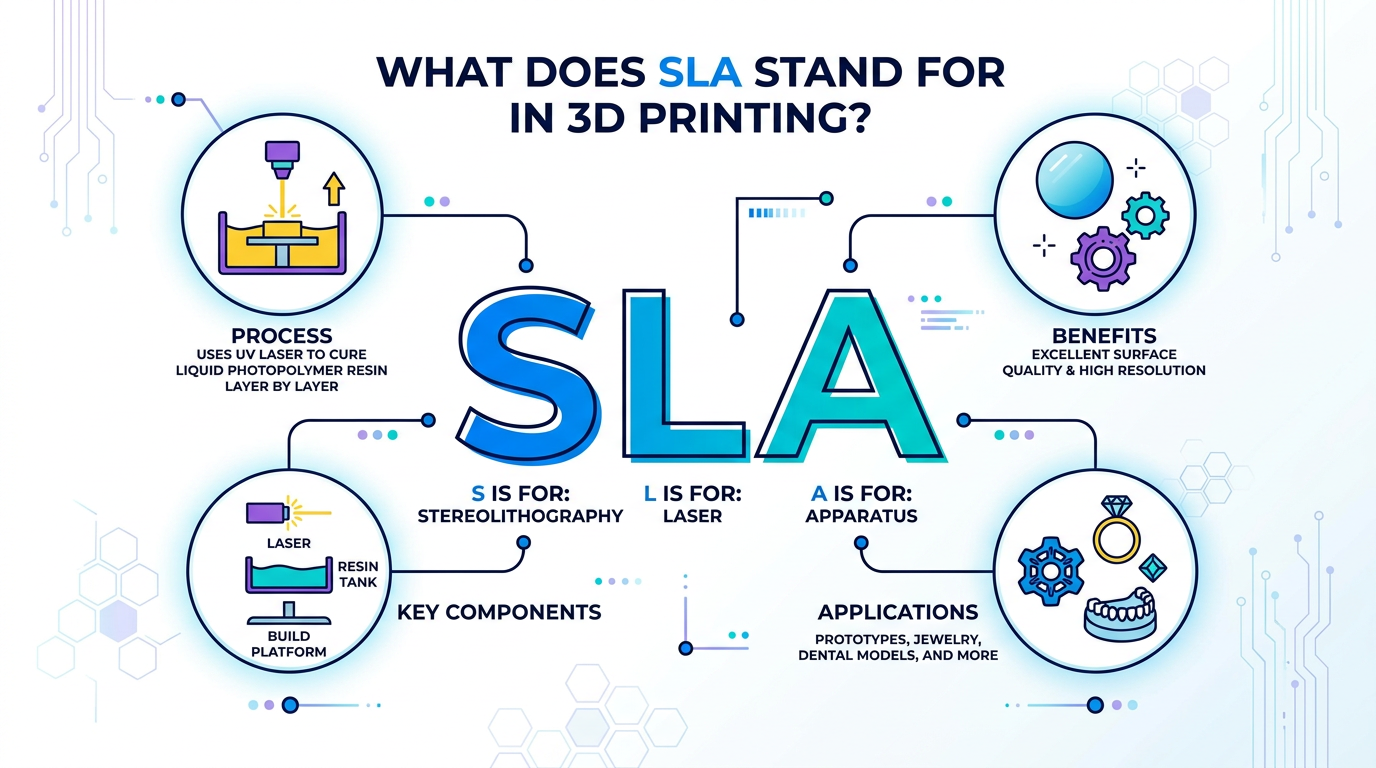
SLA stands for stereolithography in 3D printing. It is a resin-based additive manufacturing process that uses controlled light to cure liquid photopolymer resin layer by layer into a solid part. In professional use, SLA is often discussed together with other resin 3D printing methods such as DLP and LCD/MSLA because they all belong to the broader family of vat photopolymerization processes. For factories, dental labs and engineering teams, the key question is not only what SLA means, but whether the printer, resin, curing process and workflow can meet the required accuracy, surface finish, material performance and production reliability.
Introduction
When people ask “what does SLA stand for 3D printing,” they are usually trying to understand resin 3D printing for the first time. SLA is one of the best-known terms in resin 3D printing, but it is often used loosely to describe many light-curing resin printers.
Technically, SLA means stereolithography. In its classic form, SLA uses a laser to cure liquid resin. However, many modern professional resin 3D printers use different light engines, such as LCD or other projection-based systems, while still following the same basic principle: liquid resin is selectively cured by light, layer by layer.
For professional users, terminology matters because it affects printer selection, resin compatibility, application planning and post-processing control. A dental lab, for example, may care about model accuracy, repeatability and approved dental resin workflow. A factory may care about build size, surface quality, strength, thermal behavior and sample turnaround. A model-making company may focus on detail, finish and batch consistency.
What Does SLA Mean in 3D Printing?
SLA stands for stereolithography apparatus or stereolithography, depending on how the term is used. In everyday 3D printing language, SLA usually refers to a resin 3D printing process that uses light to cure liquid photopolymer resin.
Stereolithography is one of the earliest resin 3D printing technologies. It is commonly associated with vat photopolymerization, a broader additive manufacturing process category that includes methods where liquid resin in a vat is cured by light. Additive manufacturing processes are commonly grouped into categories such as material extrusion, powder bed fusion and vat photopolymerization.
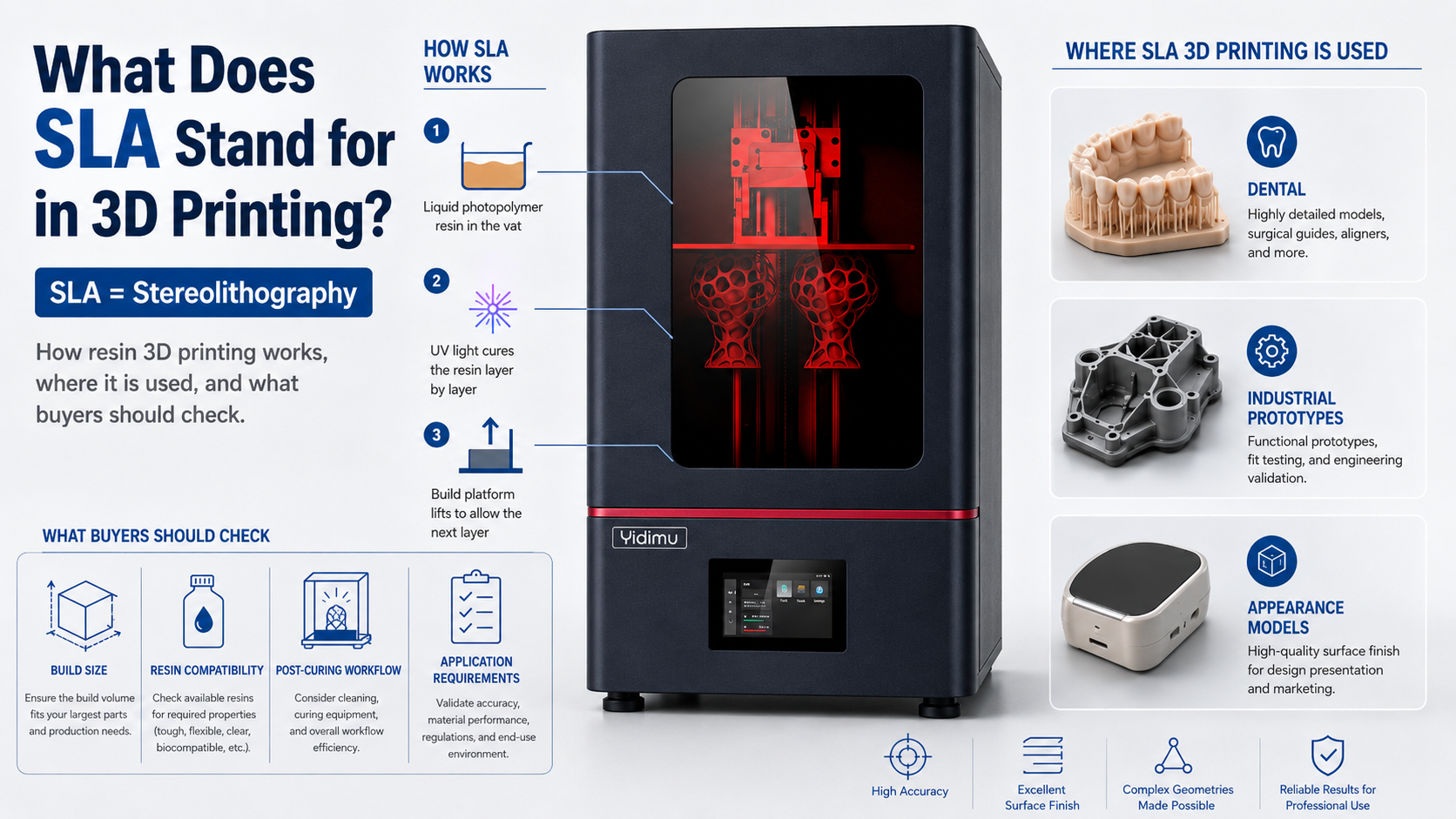
In a typical SLA-style resin workflow:
- A 3D model is prepared in slicing software.
- The model is divided into thin layers.
- Liquid photopolymer resin is placed in a vat.
- A light source cures selected areas of each layer.
- The build platform moves step by step.
- The printed part is washed, dried and UV post-cured.
- Supports are removed and the part is inspected.
The basic idea is simple, but professional results depend on many variables: exposure settings, resin type, layer thickness, support design, build orientation, post-curing time, washing method, temperature control and quality inspection.
Is SLA the Same as Resin 3D Printing?
SLA is a type of resin 3D printing, but not all resin 3D printing is technically SLA.
In many commercial discussions, people use “SLA printer” to describe almost any resin printer. This can be convenient, but it is not always precise. Professional buyers should understand the difference.
| Term | Meaning | Practical Notes |
|---|---|---|
| SLA | Stereolithography, traditionally laser-based resin curing | Often used as a general resin printing term, but technically more specific |
| DLP | Digital light projection resin printing | Cures each layer using a projected light image |
| LCD / MSLA | Masked resin printing using an LCD screen as a mask | Common in many modern professional resin systems |
| Vat photopolymerization | Broader process category for curing liquid resin in a vat | Includes SLA, DLP, LCD/MSLA and related methods |
| Resin 3D printing | General term for light-curing photopolymer printing | Useful for buyers, but less technically specific |
So, if a customer asks whether they need an SLA printer, the better question is: What application, part size, resin type, accuracy requirement and production workflow do they need?
Yidimu provides professional resin 3D printer options for different applications, including dental 3D printers for labs and clinics, industrial resin 3D printer options and flexible resin 3D printing systems.
How SLA-Style Resin 3D Printing Works
SLA-style resin printing is based on photopolymerization. Photopolymer resin changes from liquid to solid when exposed to the correct light wavelength and energy. In many resin 3D printing workflows, UV or near-UV light is used to cure each layer.
The process normally includes these stages:
3D Design or Scan Data Preparation
The workflow begins with a 3D model. This may come from CAD software, dental scanning, reverse engineering, product design or digital sculpting. The file must be checked for wall thickness, overhangs, holes, unsupported islands and print orientation.
Slicing and Support Generation
Slicing software divides the model into thin layers. It also helps generate supports and define exposure parameters. For professional work, support design can directly affect surface quality, dimensional accuracy and post-processing time.
Resin Selection
The resin should match the application. A dental model resin, castable resin, flexible resin and engineering sample resin may behave very differently. Customers should confirm the resin’s intended use, printing parameters, cleaning requirements, post-curing conditions and final part limitations.
Yidimu users can review Yidimu resin materials when planning resin selection for dental models, prototypes, casting patterns, flexible parts or sample testing.
Printing
During printing, the light source cures each layer according to the sliced data. The printer’s Z-axis stability, light uniformity, resin vat condition, build platform leveling and environmental conditions may affect results.
Washing and Drying
Freshly printed resin parts usually have uncured resin on the surface. Parts are normally washed according to the resin manufacturer’s instructions, then dried before final curing.
UV Post-Curing
Post-curing helps the printed part reach its intended material properties, depending on resin formulation and workflow. For consistent results, curing time, wavelength, part orientation and temperature should be controlled. Professional users can also consider UV curing equipment for resin prints as part of the complete workflow.
Inspection and Application Testing
After post-processing, parts should be inspected for dimensions, surface quality, deformation, cracks, support marks and functional fit. For production-related parts, sample testing is recommended before scaling up.
What Is SLA 3D Printing Used For?
SLA-style resin 3D printing is often chosen when users need fine detail, smooth surfaces and relatively precise geometry. It can support many professional applications, but suitability depends on the printer, resin, model design and post-processing control.
| Application | Why Resin Printing May Be Used | What to Confirm |
| Dental models | Fine detail, smooth surface, repeatable model production | Resin indication, curing workflow, scan/design accuracy |
| Surgical guide models or related dental workflows | Controlled resin workflow and fine features | Clinical requirements, resin indication, local regulations |
| Industrial prototypes | Good appearance and design verification | Strength, heat resistance, wall thickness, tolerance |
| Engineering samples | Fast iteration before tooling or molding | Functional load, dimensional stability, resin behavior |
| Jewelry casting patterns | Fine detail and surface quality | Burnout behavior, support placement, casting process |
| Flexible samples | Soft or elastic structures, shoe prototypes, lattice testing | Shore hardness, rebound, tear resistance, geometry |
| Product appearance models | Smooth surfaces for visual review | Surface finishing, painting, assembly tolerance |
| Small-batch trial parts | Faster testing before production decisions | Consistency, post-processing time, material limitations |
For industrial users, Yidimu’s industrial 3D printing solutions can help connect printer selection with sample-making, product development and workflow planning.
SLA, DLP and LCD: What Professional Buyers Should Understand
A buyer does not need to memorize every technical term, but they should understand the practical differences.
Classic SLA usually uses a laser point to cure resin. DLP projects an entire layer image. LCD/MSLA uses a masked light source through an LCD screen. All three can be part of resin 3D printing discussions, and all may be suitable for professional use depending on the application.
The practical buying factors are usually:
- Build volume
- XY resolution and real printed detail
- Z-axis stability
- Light uniformity
- Resin compatibility
- Print speed under real settings
- Surface finish
- Repeatability across batches
- Post-processing workflow
- Maintenance and support
- Total cost of operation
A printer with impressive specifications may still fail to meet the application if the resin, exposure settings, support strategy or curing process is not controlled. For this reason, professional users should evaluate the complete workflow, not only the printer name.
How to Choose a Resin 3D Printer for SLA-Style Applications
Use this checklist before choosing a printer:
- Define the application first
Is the printer for dental models, engineering prototypes, flexible parts, casting patterns, product samples or mixed use? - Confirm the required part size
Check the maximum model size, batch quantity and whether the printer build volume supports real production needs. - Confirm accuracy expectations
Do not only ask for theoretical resolution. Ask how the workflow supports repeatability, calibration and inspection. - Match resin to the part function
A resin for visual models may not be suitable for load-bearing parts. A dental resin may have specific indication and post-curing requirements. - Review the post-processing workflow
Washing, drying and UV curing are not optional details. They are part of the production process. - Ask for sample testing when needed
If the part has functional requirements, sample printing is often a better decision than relying only on specifications. - Check support and training
Resin printing requires parameter control, maintenance and workflow discipline. Technical support can reduce trial-and-error time.
If your team is still comparing equipment, Yidimu’s professional resin 3D printer options can be reviewed by application category. For uncertain models or materials, a sample printing service can help test printability before equipment selection.
Resin Selection Matters More Than Many Buyers Expect
SLA-style resin printing is not only about the machine. The resin strongly affects print success, surface finish, mechanical behavior, flexibility, heat resistance, color, odor, cleaning method and curing requirements.
| Resin Type | Typical Use | Key Questions Before Use |
| Model resin | Dental models, display models, prototypes | Is the surface detail and dimensional stability suitable? |
| ABS-like resin | Engineering samples and appearance prototypes | Does it meet the strength and impact expectations? |
| Castable resin | Jewelry or casting patterns | Is the burnout workflow compatible with the casting process? |
| Flexible resin | Soft samples, lattice structures, shoe-related prototypes | What hardness, rebound and tear resistance are required? |
| Dental-related resin | Dental models or specific dental workflows | What is the resin indication and required post-curing process? |
| Water-washable resin | Easier cleaning workflow in certain applications | Is water washing suitable for the part and resin instructions? |
For dental-related applications, customers should confirm resin indication, post-curing process and local regulatory requirements before clinical or intraoral use. This is especially important for surgical guides, temporary dental parts, intraoral applications or any workflow involving patient contact. FDA guidance for additive manufactured medical devices emphasizes that device-specific manufacturing processes and post-processing can be important considerations for medical applications.
Professional Workflow Checklist for SLA-Style Resin Printing
Use this workflow as a practical reference:
- Confirm the application: dental, industrial, flexible, casting, model-making or product development.
- Check the 3D model: wall thickness, unsupported features, drainage holes and orientation.
- Select the resin: match the resin to the required function, surface and post-processing.
- Prepare slicing settings: layer height, exposure, supports, lift speed and print orientation.
- Prepare the printer: level platform, check resin vat, inspect screen or light path, confirm resin condition.
- Print the part: monitor the first layers and avoid unnecessary environmental changes.
- Wash the part: follow resin instructions and avoid leaving uncured resin on the surface.
- Dry before curing: prevent liquid residue from affecting surface quality.
- UV post-cure: use the recommended curing time and equipment.
- Remove supports carefully: avoid damaging thin features or functional surfaces.
- Inspect the part: check dimensions, fit, surface, warpage and cracks.
- Record parameters: keep successful settings for repeatable production.
A controlled workflow is especially important for labs, factories and professional users because small changes in exposure, resin temperature, cleaning or curing may affect final results.
Common Mistakes to Avoid
Mistake 1: Thinking SLA Only Means One Printer Type
SLA has a specific technical meaning, but many people use it broadly for resin 3D printing. When buying equipment, clarify whether you are discussing laser SLA, DLP, LCD/MSLA or resin printing in general.
Mistake 2: Choosing a Printer Only by Resolution
High resolution is useful, but it does not guarantee better printed parts. Light uniformity, Z-axis stability, resin behavior, support design and post-curing also matter.
Mistake 3: Ignoring Resin Compatibility
Not every resin is suitable for every printer or application. Always confirm wavelength, exposure settings, viscosity, curing requirements and intended use.
Mistake 4: Underestimating Post-Processing
Washing and curing are part of the production workflow. Poor post-processing may lead to sticky surfaces, weak parts, deformation or inconsistent results.
Mistake 5: Printing Dental Parts Without Checking Requirements
Dental workflows may involve special material indications and local regulatory requirements. Customers should confirm resin indication, post-curing process and local regulatory requirements before clinical or intraoral use.
Mistake 6: Expecting One Resin to Do Everything
A resin that works well for visual models may not work for flexible samples, casting patterns or functional prototypes. Application requirements vary.
Mistake 7: Skipping Sample Testing
For new products, engineering samples or flexible structures, sample testing helps confirm whether the model, resin and workflow are suitable before larger production decisions.
Safety Notes for Resin 3D Printing
Liquid photopolymer resin should be handled carefully. Users should follow resin safety data sheets, wear suitable gloves, avoid direct skin contact, keep the workspace ventilated and use eye protection when needed. Post-processing may involve cleaning liquids, UV curing and support removal, so operators should build a safe and repeatable workflow.
Health and safety guidance for 3D printing commonly highlights ventilation, training, personal protective equipment and risk control as important considerations, especially where emissions, chemicals, UV exposure or post-processing are involved.
Professional environments should also define resin storage, waste handling, cleaning liquid management and emergency procedures. Resin waste and contaminated cleaning liquids should be handled according to local requirements and material instructions.
FAQ
What does SLA stand for in 3D printing?
SLA stands for stereolithography. It is a resin 3D printing process that uses controlled light to cure liquid photopolymer resin into solid layers.
Is SLA the same as resin 3D printing?
SLA is one type of resin 3D printing. However, many people use “SLA” as a general term for resin 3D printers, even when the machine uses DLP or LCD/MSLA technology.
Is SLA 3D printing good for dental models?
SLA-style resin printing can be suitable for dental models when the printer, resin, exposure settings, washing and post-curing workflow are properly controlled. Dental users should confirm resin indication, post-curing process and local regulatory requirements before clinical or intraoral use.
Is SLA 3D printing good for industrial prototypes?
It can be useful for industrial prototypes, especially when fine detail, smooth surfaces and fast design verification are needed. However, mechanical performance depends on the resin, part design and post-processing.
What materials are used in SLA 3D printing?
SLA-style printers use photopolymer resins. Different resins may be designed for models, dental workflows, casting patterns, flexible parts, engineering samples or visual prototypes.
Do SLA prints need UV curing?
In most resin workflows, printed parts require washing and UV post-curing. The exact process depends on the resin and application.
Can SLA 3D printed parts be used as final products?
Sometimes, but it depends on the application, resin properties, mechanical requirements, regulatory requirements and production workflow. Many users first use resin printing for prototypes, models, samples and small-batch validation.
What should I ask before buying an SLA-style resin 3D printer?
Ask about build volume, resin compatibility, real application accuracy, post-processing workflow, maintenance, technical support, sample testing and whether the printer fits your dental, industrial or flexible resin application.
Conclusion
SLA stands for stereolithography in 3D printing, but in real purchasing conversations it often points to a broader question: how should a professional user choose a resin 3D printing workflow?
For factories, dental labs, clinics, engineers and product development teams, the best decision is not based on terminology alone. It depends on model size, resin requirement, application, expected workflow, production needs and post-processing control.
If you are evaluating resin 3D printing for dental models, industrial prototypes, flexible parts, sample production or professional workflow planning, you can contact Yidimu with your model size, resin requirement, application, expected workflow and production or sample-making needs. Yidimu can help review the printing direction and suggest a suitable resin 3D printing solution.
References
- Stereolithography is commonly described as a resin-based 3D printing method where light cures photopolymer resin layer by layer.
- Additive manufacturing processes are commonly categorized into groups including vat photopolymerization.
- 3D printing safety guidance commonly emphasizes ventilation, training, PPE and post-processing controls.
- Medical and dental-related additive manufacturing workflows may require attention to manufacturing process, output and regulatory requirements.